CHOOSE BY WHAT MATTERS
Could Promic Speech AI be the best audio transcription app for your meetings?
If you need a meeting record you can check, the right app does more than turn speech into text. Promic combines live and file transcription, speaker identification, review, minutes and archive search in one Windows application. See where it fits and check its workstation requirements.
Start a free 15-day trial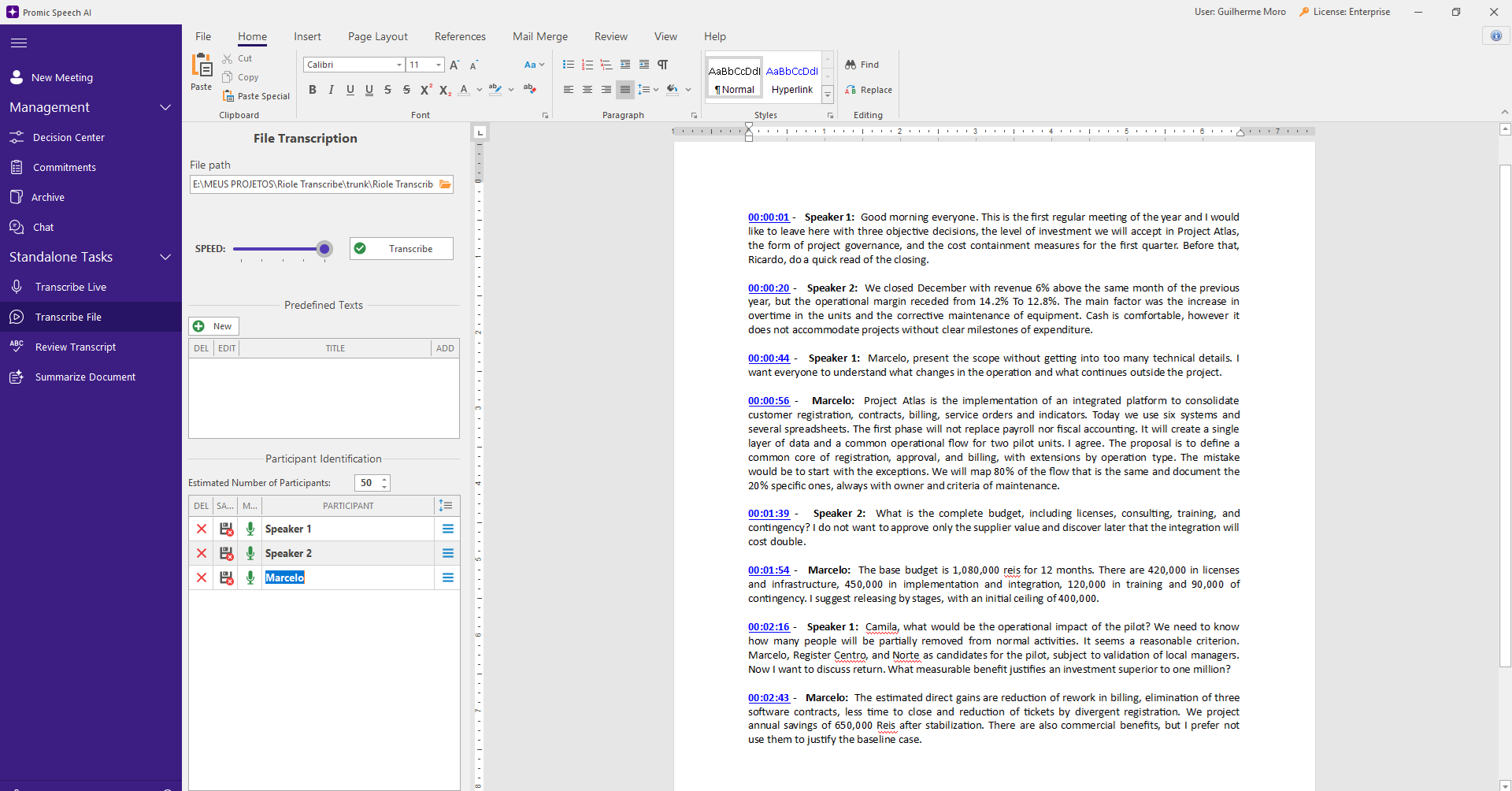
Transcribe live or open a recording
For in-person meetings, use a room microphone or USB audio interface. For Teams, Zoom or Meet calls, select the window to capture audio without adding a bot to the meeting. You can also open audio or video files. In Professional, Whisper runs on the workstation NVIDIA GPU. Text quality depends on audio capture, language and overlapping speech.
Choose a transcription model
Whisper Large V3 Turbo is the default. The catalog also offers Large V3, Medium Q8, Medium English Q8 for English audio, and Small. In Settings, choose an installed file that fits your GPU and the meeting language.
Review the text and speakers
After you estimate the participant count before the meeting, the app can separate the voices of up to 50 participants. Correct names and assignments and save voice profiles to recognize recurring participants in future meetings. Overlapping speech and similar voices may require review. When the linked recording is accessible, listen alongside the document and use time links to return to a statement. Export the reviewed text as DOCX or PDF.
Draft minutes you can edit
After transcription, a local language model can draft a summary in styles such as executive minutes, detailed or action-focused. Edit the instructions, check names, numbers and conclusions, and decide what belongs in the final document.
Trace decisions and commitments to their source
When the relevant extractions are enabled, Promic suggests decisions, disagreements and commitments for review. The Decision Center shows pending items, conditions and facts needing attention; history analysis can record revoked decisions when related meetings exist. Track owners and deadlines for accepted commitments. Chat answers cite source meetings, and semantic search requires prior archive indexing.
Keep meeting content in your infrastructure
In Professional, transcription, summaries and the archive run on the customer Windows workstation. Meeting audio and text are not sent to cloud AI services. License activation and verification and model downloads use the internet. The application has no quota on meeting count or transcription hours and no per-minute audio or per-token AI charge. Practical volume depends on the GPU, model and storage.
Check whether it fits your work
Processing meetings requires 64-bit Windows and an NVIDIA RTX GPU with at least 8 GB of video memory. Without an NVIDIA GPU, or in consultation-only mode, you can access the archive and review but cannot process new meetings. If you only need quick notes in a browser or on a phone, consider whether a full Windows app fits your workflow.
FAQ
Frequently asked questions
Is it the best app for everyone?
That depends on the job. Promic is designed for meetings needing reviewable transcripts, identified speakers, minutes and a sourced history. A simpler tool may fit quick notes better.
Can I transcribe an existing audio file?
Yes. Open it in the app to transcribe, review speakers and prepare the document. Video files can follow the same workflow.
Does transcription work entirely without internet?
Meeting content is processed locally. License activation and verification and model downloads use the internet; online calls also depend on the meeting platform.
Can I try it before subscribing?
Yes. Install it from Microsoft Store and request the 15-day Professional trial in the app. First check that your workstation has an NVIDIA RTX GPU with at least 8 GB of video memory.
GUIDES
See also
Automatic meeting minutes
Transcript, speakers, a minutes-style summary and DOCX or PDF export.
02Offline transcription
What runs on your workstation, what uses the internet and what it means for data protection.
03In-person meeting transcription
Room microphone, speakers separated live and minutes at the end, with no video call.