In the room
Microphone or USB audio interface on the Windows workstation. No meeting bot or call platform is required.
LOCAL AI AND TRANSCRIPTION FOR MEETINGS
Transcribe in-person meetings, online calls and files. Identify speakers, create summaries and track decisions and commitments. With Professional, AI runs on your workstation GPU; meeting content is not sent to the cloud or Riole.
64-bit Windows · NVIDIA RTX with at least 8 GB · Manual delivery by email
NO VIDEO CALL REQUIRED
Use a room microphone or audio interface to transcribe conversations in the same space. For online calls, capture window audio. Recorded files fit the workflow too.
Microphone or USB audio interface on the Windows workstation. No meeting bot or call platform is required.
Capture audio from a Teams, Zoom or Meet window without placing a bot among participants.
Open audio or video files and review the text in the application editor.
FROM AUDIO TO ACTION
Capture live audio from a microphone or meeting window, or open audio and video files. Whisper runs on your GPU.
Identify speakers, listen alongside the text, edit your minutes, and export DOCX or PDF.
Extract decisions, disagreements and commitments. Ask the archive questions and see citations to source meetings.
SEE THE SOFTWARE
Five real application windows, one complete story: capture what was said, organize decisions, and return to the source whenever you need to check.
Real Promic Speech AI screenshots captured with an Enterprise license. Features and architecture vary by edition.
01 / CAPTURE
Transcribe live from a microphone or a meeting window. Text appears in the editor while you follow the speakers and refine the document.
APPLICATION WINDOWLive transcription
02 / USE RECORDINGS
Open an audio or video file and follow its progress in the same workspace where you will review the transcript. The application does not charge by audio minute.
APPLICATION WINDOWFile transcription
03 / UNDERSTAND HISTORY
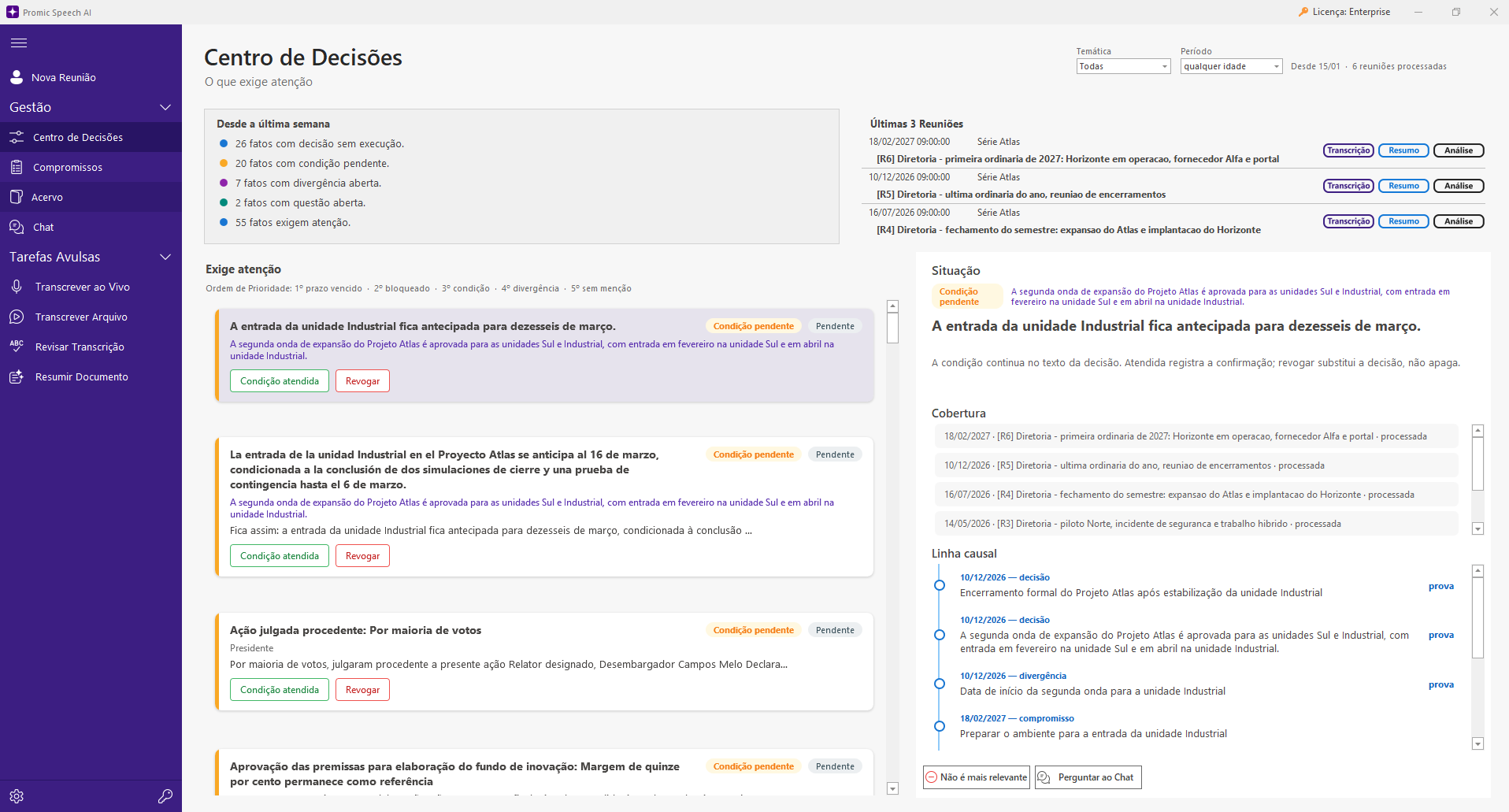
The Decision Center brings together open items, conditions and disagreements. Open a fact to see its coverage in later meetings, its timeline and the statement behind it.
APPLICATION WINDOWDecision Center
04 / FOLLOW THROUGH
Review suggestions, assign owners, change deadlines and track cards. Accepted commitments return as open items at the next meeting.
APPLICATION WINDOWCommitments
05 / ASK
Find decisions and open items in natural language. Chat answers within the selected period and topics, with citations that open the source meeting.
APPLICATION WINDOWArchive chat
64-bit Windows · NVIDIA RTX with at least 8 GB · Manual delivery by email
CONTROL THE AI WORKFLOW
Choose what the meeting needs and review the result before you deliver the minutes.
Speaker separation runs locally. Rename participants, merge duplicate voices and save the voices of frequent participants. In a PROMIC chamber, the speaker can come from the desk microphone.
Whisper Large V3 Turbo is the default transcription engine; Large V3 and Medium are also available. For summaries and chat, choose local models from the catalog according to your GPU and edition.
Use executive minutes, detailed, action-focused or chronological styles. Edit summary instructions and review the document before sharing it.
BEYOND MEETING NOTES
Meeting assistants and local transcribers can capture one meeting. Promic Speech AI also connects decisions, disagreements and commitments to the history that follows.
A decision keeps a reference to the meeting and passage behind it. When the recording is accessible, time links take you to the moment for review.
The archive compares meetings on the same topic to show conditions, reversals and open items as they change.
Accepted commitments appear by owner and deadline and return to the analysis of the next meeting.
Need quick notes from a call? A browser tool may be enough. Need reviewable minutes, traceable history and content in your infrastructure? Explore Promic.
PRIVACY BY ARCHITECTURE
Audio, transcripts, summaries, names and voices are processed and stored in the customer’s infrastructure. Riole does not receive or access this content.
License activation and model downloads use operational internet connections.GPU, AI models and archive on the user’s Windows workstation.
GPU, models and database on a central server in the local network, with users and access levels.
CHOOSE AN EDITION
Send a request using the form. Our team confirms payment details and delivers the license by email.
For professionals and teams working by workstation
US$20/month per workstation
For organizations with multiple users
Contact us
For public organizations, by proposal
By proposal
You need 64-bit Windows and an NVIDIA RTX GPU with at least 8 GB of video memory. AI models download on first launch. Check your GPU before requesting a trial or purchase.
FAQ
At the first activation of the trial serial, not when you request it or download the installer. We send access manually by email.
No. Meeting content is processed and stored in your infrastructure. License activation and model downloads use operational internet connections.
No. The form records your interest. Our team will contact you about payment, licensing and installation.
THE COMPANY
Riole develops technology for meetings and institutions. Review the company details and contact channels before requesting your trial or license.
Meet Riole and contact usNEXT STEP
Tell us how to reach you. We will email the next steps and, for trials, the installer link and serial.
64-bit Windows · NVIDIA RTX with at least 8 GB · Manual delivery by email